
こんにちは、中村です。
Googleから発表された、現在プレビューのConversational Analytics APIはデータ集計と可視化に優れていたため、今回はBigQueryのデータをこれで分析する方法について解説します。
目次
概要
Conversational Analytics APIは、BigQuery・Looker・LookerStudioのデータに対して自然言語でデータ集計ができるAPIです。単発での集計に加えて、エージェントを作成することによって会話をしながらデータの集計・可視化をすることができるのが特徴です。
使ってみた
今回は、Google公式が公開しているColabのサンプルコードをもとに試してみます。(以下のコードはColabで実行することを想定しています。)
準備
今回使うデータは以下の2テーブルです。BigQueryで事前にテーブルにしておきます。
また今回使うコードは以下です。
まずはインポートと権限について記述してあります。
import json
import json as json_lib

import altair as alt
import pandas as pd
import requests
from IPython.display import HTML, display
from google.colab import auth
from pygments import formatters, highlight, lexers

auth.authenticate_user()

access_token = !gcloud auth application-default print-access-token
headers = {
    "Authorization": f"Bearer {access_token[0]}",
    "Content-Type": "application/json",
}
次にGoogle Cloudのプロジェクトを指定とプロンプトを指定します。
ここでは、system_instruction にプロンプトだけでなく、YAML形式のセマンティックモデルも指定できます。
# @title Billing Project and Prompt (System Instruction)

# fmt: off
billing_project = "[your-project-id]"  # @param {type:"string"}

location = "global"
api_version = "v1beta"

# provide critical context for your Conversational Analytics Agent here
system_instruction = "Think like an Analyst"  # @param {type:"string"}
# fmt: on次に、BigQueryのデータソース登録とクエリ例の入力部分です。
クエリ例は今回は使いません
# @title BigQuery Datasource

bigquery_data_sources = {
    "bq": {
        "tableReferences": [
            {
                "projectId": "[your-project-id]",
                "datasetId": "nakamura_dataset",
                "tableId": "mock_data",
            },
            {
                "projectId": "[your-project-id]",
                "datasetId": "nakamura_dataset",
                "tableId": "mock_mst",
            },
            # Add more table references here
        ]
    }
}

optional example queries (only leveraged for BigQuery datasources currently)
example_queries = [
    {
        "naturalLanguageQuestion": "What is the highest observed positive longitude?",
        "sqlQuery": "SELECT MAX(longitude) FROM airports",
    },
]
続いて、APIから返されるテキスト・スキーマ・SQL・チャートなどのレスポンスを処理・表示するためのユーティリティ関数群を定義します。
# @title Streaming Chat Messages


def is_json(str):
    try:
        json_object = json_lib.loads(str)
    except ValueError:
        return False
    return True


def handle_text_response(resp):
    parts = resp["parts"]
    print("".join(parts))


def get_property(data, field_name, default=""):
    return data[field_name] if field_name in data else default


def display_schema(data):
    fields = data["fields"]
    df = pd.DataFrame(
        {
            "Column": map(lambda field: get_property(field, "name"), fields),
            "Type": map(lambda field: get_property(field, "type"), fields),
            "Description": map(
                lambda field: get_property(field, "description", "-"), fields
            ),
            "Mode": map(lambda field: get_property(field, "mode"), fields),
        }
    )
    display(df)


def display_section_title(text):
    display(HTML(f"<h2>{text}</h2>"))


def format_bq_table_ref(table_ref):
    return "{}.{}.{}".format(
        table_ref["projectId"], table_ref["datasetId"], table_ref["tableId"]
    )


def format_looker_table_ref(table_ref):
    return "lookmlModel: {}, explore: {}".format(
        table_ref["lookmlModel"], table_ref["explore"]
    )


def display_datasource(datasource):
    source_name = ""

    if "studioDatasourceId" in datasource:
        source_name = datasource["studioDatasourceId"]
    elif "lookerExploreReference" in datasource:
        source_name = format_looker_table_ref(datasource["lookerExploreReference"])
    else:
        source_name = format_bq_table_ref(datasource["bigqueryTableReference"])

    print(source_name)
    display_schema(datasource["schema"])


def handle_schema_response(resp):
    if "query" in resp:
        print(resp["query"]["question"])
    elif "result" in resp:
        display_section_title("Schema resolved")
        print("Data sources:")
        for datasource in resp["result"]["datasources"]:
            display_datasource(datasource)


def handle_data_response(resp):
    if "query" in resp:
        query = resp["query"]
        display_section_title("Retrieval query")
        print("Query name: {}".format(query["name"]))
        print("Question: {}".format(query["question"]))
        print("Data sources:")
        for datasource in query["datasources"]:
            display_datasource(datasource)
    elif "generatedSql" in resp:
        display_section_title("SQL generated")
        print(resp["generatedSql"])
    elif "result" in resp:
        display_section_title("Data retrieved")

        fields = map(
            lambda field: get_property(field, "name"),
            resp["result"]["schema"]["fields"],
        )
        dict = {}

        for field in fields:
            dict[field] = [get_property(el, field) for el in resp["result"]["data"]]

        display(pd.DataFrame(dict))


def handle_chart_response(resp):
    if "query" in resp:
        print(resp["query"]["instructions"])
    elif "result" in resp:
        vegaConfig = resp["result"]["vegaConfig"]
        alt.Chart.from_json(json_lib.dumps(vegaConfig)).display()


def handle_error(resp):
    display_section_title("Error")
    print("Code: {}".format(resp["code"]))
    print("Message: {}".format(resp["message"]))


def get_stream(url, json):
    s = requests.Session()

    acc = ""

    with s.post(url, json=json, headers=headers, stream=True) as resp:
        for line in resp.iter_lines():
            if not line:
                continue

            decoded_line = str(line, encoding="utf-8")

            if decoded_line == "[{":
                acc = "{"
            elif decoded_line == "}]":
                acc += "}"
            elif decoded_line == ",":
                continue
            else:
                acc += decoded_line

            if not is_json(acc):
                continue

            data_json = json_lib.loads(acc)

            if "systemMessage" not in data_json:
                if "error" in data_json:
                    handle_error(data_json["error"])
                continue

            if "text" in data_json["systemMessage"]:
                handle_text_response(data_json["systemMessage"]["text"])
            elif "schema" in data_json["systemMessage"]:
                handle_schema_response(data_json["systemMessage"]["schema"])
            elif "data" in data_json["systemMessage"]:
                handle_data_response(data_json["systemMessage"]["data"])
            elif "chart" in data_json["systemMessage"]:
                handle_chart_response(data_json["systemMessage"]["chart"])
            else:
                colored_json = highlight(
                    acc, lexers.JsonLexer(), formatters.TerminalFormatter()
                )
                print(colored_json)
            print("\n")
            acc = ""
以下が分析依頼を行う部分です。
# @title [Stateless] Chat using Inline Context

chat_url = f"https://geminidataanalytics.googleapis.com/{api_version}/projects/{billing_project}/locations/global:chat"

# fmt: off
question = "Show the schema of datasource"  # @param {type:"string"}
# fmt: on

# Construct the payload
chat_payload = {
    "parent": f"projects/{billing_project}/locations/global",
    "messages": [{"userMessage": {"text": question}}],
    "inline_context": {
        "datasource_references": bigquery_data_sources,
        "options": {
            "analysis": {
                # Optional - if wanting to use advanced analysis with python
                "python": {"enabled": True}
            }
        },
    },
}

# Call get_stream method to stream the response
get_stream(chat_url, chat_payload)
実際に使ってみる
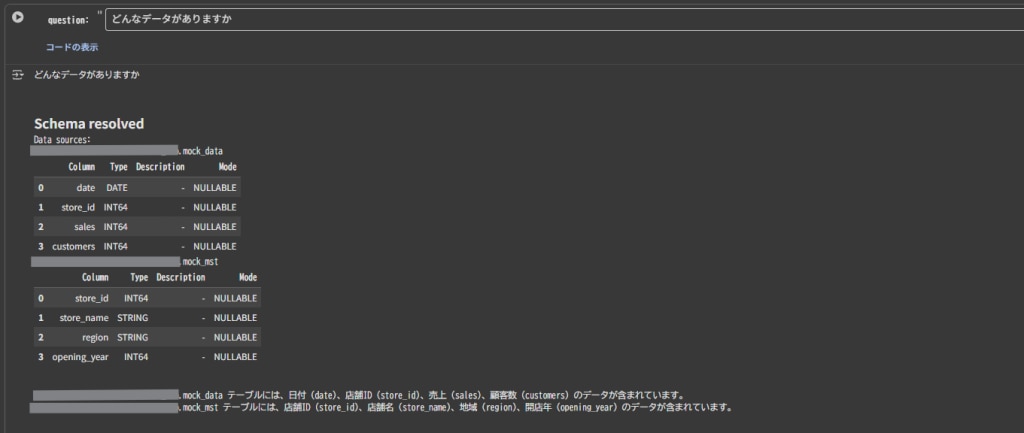
1.プロンプト:どんなデータがありますか
まずは、分析前にどのようなデータが含まれているのか確認してみましょう。
結果
mock_data テーブルには、日付 (date)、店舗ID (store_id)、売上 (sales)、顧客数 (customers) のデータが含まれています。 mock_mst テーブルには、店舗ID (store_id)、店舗名 (store_name)、地域 (region)、開店年 (opening_year) のデータが含まれています。
今回はsystem_instructionにカラムの説明を設定していないため、列名から回答が生成されているようです。
2.プロンプト:店舗IDごとの売り上げを教えてください
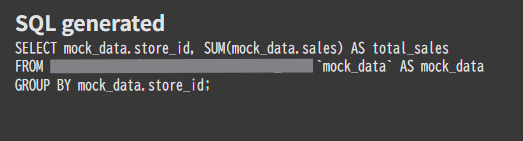
続いて単体のテーブルで回答できるプロンプトを投げます。
生成されたSQL
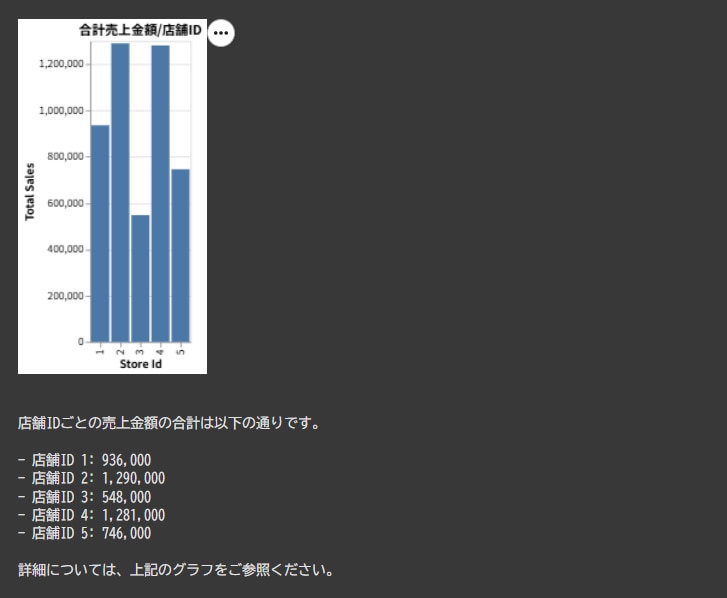
結果
シンプルな集計内容だったこともあり、正確な結果が返されました。
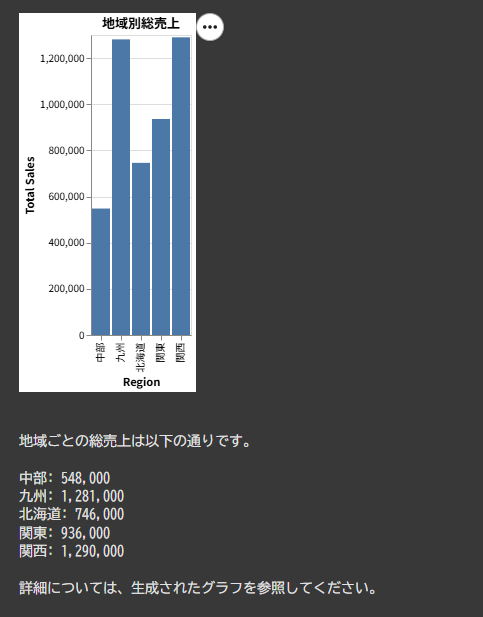
(グラフが作成できる場合にはVega-Liteで応答がかえってくるため、handle_chart_response()で描画しています。)
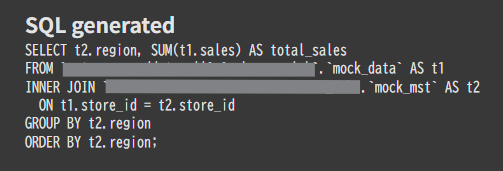
3.プロンプト:地域ごとの売り上げを出してください
今度は、複数テーブルを参照する必要があるプロンプトを投げます。system_instructionでリレーション情報は与えていない状態です。
生成されたSQL
結果
リレーションを正しく推定し、正確に集計できました。
まとめ
今回はConversational Analytics APIを使った分析をしてみました。
グラフの出力などもできるのがうれしいですね。
皆さんもぜひ使ってみてください!